
Custom DKIM Selector: When And Why To Use One
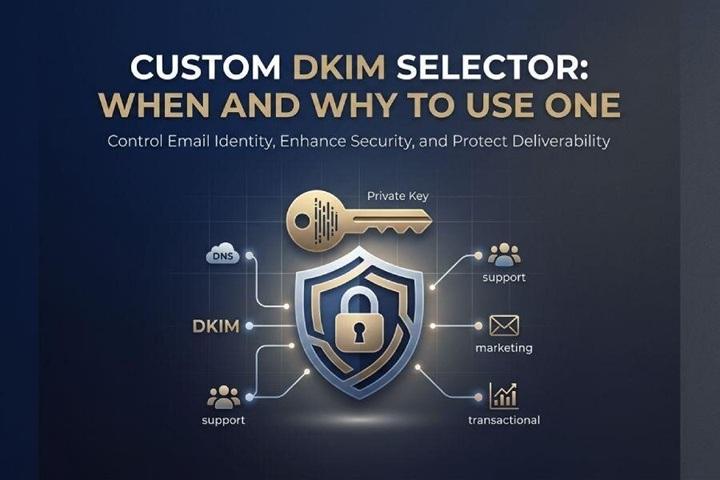
A DKIM selector is a label used by DomainKeys Identified Mail to locate the correct public key in DNS during the email authentication process. DKIM works by adding a DKIM signature to outgoing messages. That digital signature is created with a private key controlled by the sending service, while receiving systems use the matching public key published in your DNS records to validate the message.
In practical terms, a DKIM-enabled email server signs selected parts of the message, including specific email headers and sometimes the body. The resulting DKIM signature appears in the message as the DKIM-Signature header, sometimes mistakenly referenced as the DKIM-signature header. This header contains several important fields, including the d= tag, which identifies the signing domain, and the s= tag, which helps you find DKIM selector.
How the Selector Connects the Signature to DNS
When a mailbox provider such as Gmail, Outlook, Google, or Microsoft Exchange Online receives a message, it performs a DNS query based on the d= tag and s= tag in the DKIM signature. For example, if a message from *example.com* contains:
d=*example.com*; s=marketing;
The receiver looks for the public key at:
marketing._domainkey.*example.com*
That DNS location may contain a TXT record with a value beginning with v=DKIM1, or it may point through a CNAME record to an email provider’s infrastructure. The receiving server retrieves the public key, compares it against the DKIM signature, and completes the verification process. If the signature validates, the message passes this cryptographic authentication check.
Sample DKIM Signature
A simplified sample DKIM signature might look like this:
DKIM-Signature: v=1; a=*rsa*-sha256; d=*example.com*; s=marketing;
h=from🇹🇴subject:date; bh=...; b=...
In this DKIM signature, the d= tag is *example.com*, and the s= tag is marketing. The selector value tells the receiver which DNS records to inspect. During header inspection, tools such as dmarcian, MXToolbox, DKIM Inspector, or a DKIM validator can show whether the DKIM signature header was parsed correctly and whether the public key was found.
Why the Selector Matters
The DKIM selector allows a domain owner to use multiple DKIM keys at the same time. This is essential when several platforms send mail for the same domain, such as Microsoft 365, Salesforce.com, an internal SMTP server, a security gateway, and marketing automation tools. Each service can use its own private key, public key, and selector without interfering with the others.
Default vs. Custom DKIM Selectors: Key Differences
Default selectors are generated automatically by an email provider or platform. For example, Microsoft 365 often uses selectors such as selector1 and selector2, while other third-party providers may create values like *google*, s1, s2, or DKIM. These defaults are convenient because the provider’s support team, admin console, Delivery Center, or customer Forum usually documents the required DNS records clearly.
A custom DKIM selector, by contrast, is chosen by the domain owner or administrator. Instead of using a generic selector, you might create selectors such as:
m365-2025._domainkey.*example.com*
salesforce-na._domainkey.*example.com*
university-mail._domainkey.*example.com*
Operational Differences
The key difference is control. A default selector is easy to deploy but may not describe the service, environment, or mailflow clearly. A custom DKIM selector can identify a business unit, region, application, or email authentication path. This is especially useful when troubleshooting email transmission across relay servers, email forwarding systems, and third-party providers.
Custom selectors also support better key management. If every sending platform has a unique selector and a separate key pair, administrators can rotate one private key without disrupting the entire domain. This improves key uniqueness, simplifies audits, and reduces operational risk.
When to Use a Custom DKIM Selector
A custom DKIM selector is most valuable when your domain sends mail from more than one platform. If *example.com* uses Microsoft 365 for employee mail, Salesforce.com for CRM notifications, and another provider for newsletters, each platform should have its own selector, private key, and public key.
Multiple Email Platforms and Third-Party Senders
Custom selectors are strongly recommended when working with third-party providers. A marketing platform, billing application, university email system, or customer support tool may all need to sign messages using your domain. Instead of sharing one DKIM key, each provider should publish separate DNS records under _domainkey.
This separation matters because a compromised private key at one vendor should not require you to rebuild your entire domain’s email authentication setup. You can revoke or rotate the affected selector while keeping other senders active.
Key Rotation and Security Events
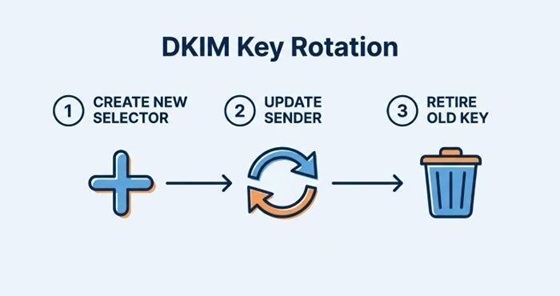
Use a custom DKIM selector when implementing a formal key rotation policy. For example, you may create m365-2024 and later add m365-2025. Once key propagation completes in DNS, the sending platform can switch to the new private key. After confirming that the new DKIM signature passes validation in Gmail, Outlook, and other email clients, the old public key can be retired.
Custom selectors are also useful after security incidents. If a private key is exposed, the domain owner can remove the related TXT record or CNAME target from DNS and issue a new selector. This limits damage while preserving legitimate mailflow.
Benefits of Custom DKIM Selectors for Security, Deliverability, and Brand Control
Security and Cryptographic Control
DKIM is an authentication method based on asymmetric cryptography, commonly using RSA. The Private Key remains with the sender, while the Public Key is published in DNS records. A custom selector lets security teams map every DKIM signature back to a known platform in the organization’s domain catalog.
If a message fails, administrators can review the email headers, inspect the DKIM-signature header, check the d= tag and s= tag, and determine exactly which sender or provider created the signature. This level of visibility is valuable for email security experts investigating spoofing, phishing, or misconfigured applications.
Deliverability and DMARC Alignment
Custom selectors can also support deliverability. Mailbox providers such as Gmail and Outlook evaluate authentication results when deciding whether messages belong in the inbox, spam folder, or quarantine. A valid DKIM signature contributes to trust, especially when combined with SPF and DMARC.
For DMARC alignment, the signing domain in the d= tag must align with the visible From domain according to your DMARC policy. The selector itself does not determine alignment, but a clear selector strategy helps administrators perform an alignment check quickly. When DMARC alignment fails, reviewing the email headers, the DKIM signature header, and the selector can reveal whether the wrong provider, domain, or DNS entry is being used.
Brand Control and Provider Accountability
Custom selectors also give organizations better brand control. If every provider uses a recognizable selector, the domain owner can identify unauthorized sending sources more easily. For example, salesforce-comms can identify Salesforce.com, while microsoft365-prod can identify Microsoft 365 or Microsoft Exchange Online.
This structure is especially helpful when an organization has many business units, a complex MX Record setup, or a mixture of internal and external senders. It also makes provider accountability easier because each email provider signs with a distinct DKIM identity.
Best Practices for Creating, Managing, and Rotating DKIM Selectors
Naming and DNS Design
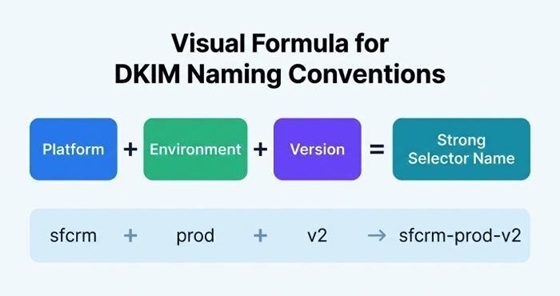
A good selector naming convention may include the platform, environment, and year:
m365-prod-2025
sfcrm-prod-2025
gateway-us-2025
Each selector should map to the correct _domainkey hostname. Depending on the provider, you may publish a TXT value containing v=DKIM1 and the public key, or a CNAME record pointing to the provider infrastructure. Some platforms prefer CNAME-based delegation because it lets the provider manage the rotating public key without requiring frequent DNS edits.
Before enabling signing, confirm that all required DNS records are visible globally. Use tools such as MXToolbox, dmarcian, DKIM Inspector, or a DKIM validator to verify the record and check for formatting errors.
Key Management and Rotation
Maintain an inventory of every DKIM selector, associated sender, private key, public key, and owner. This is the foundation of effective key management. The inventory should note whether the selector is active, deprecated, or scheduled for removal.
For key rotation, create the new selector first, publish the new public key, wait for DNS TTLs and key propagation, then configure the sender to sign with the new private key. After confirming successful authentication in real-world email headers, retire the old selector. Never delete old DNS records before senders have stopped using the old DKIM signature.
Validation and Monitoring
After deployment, send test messages to Gmail, Outlook, and other major email clients. Review the email headers and confirm that the DKIM signature passes, the d= tag matches the expected domain, and the s= tag shows the intended custom selector. Also, check that DMARC passes or aligns as expected.
Monitoring should include failed DKIM results, unexpected selectors, missing public key errors, and messages signed by unknown infrastructure. Over time, this discipline keeps email authentication reliable, improves deliverability, and gives the domain owner precise control over every approved sender.