
What Server Do You Need to Run an AI Language Model?
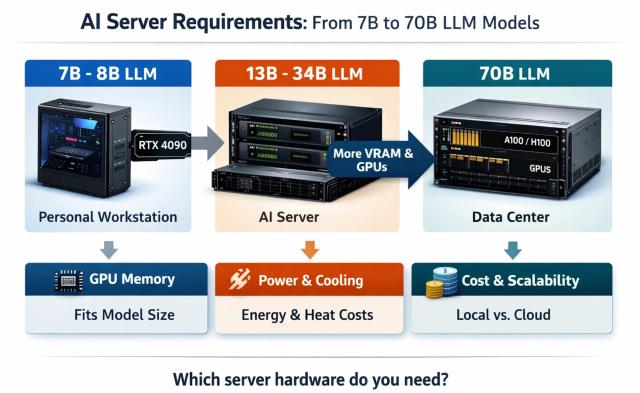
Running your own AI model sounds exciting, but one question appears almost immediately: what kind of server do you actually need? A small language model can run on a personal workstation, while a large 70B parameter model may require enterprise-grade GPUs and expensive infrastructure. Choosing the wrong hardware can lead to wasted money, unnecessary complexity, or disappointing performance.
Understanding AI server requirements helps you select the right balance between performance, cost, and scalability. Whether you are a developer experimenting with local AI, a startup building applications, or a company deploying production systems, the correct hardware choice makes a huge difference.
Understanding LLM Model Sizes: What Do 7B, 13B, and 70B Mean?
The number in an LLM name represents the approximate number of parameters inside the model. Parameters are the internal values that the neural network uses to understand language, generate answers, and recognize patterns. A simple analogy: a smaller model is like a compact car. It is cheaper, easier to maintain, and consumes fewer resources. A large model is closer to a heavy truck — it can carry much more information, but it needs a stronger engine and more fuel.
A 7B model contains around seven billion parameters, while a 70B model contains approximately ten times more. However, a larger model does not automatically mean it is the best option. The right choice depends on your task, available hardware, and expected workload.
AI Server Requirements for Different LLM Sizes
The biggest challenge when running an LLM locally is usually not raw computing power, but memory capacity. GPU VRAM determines how large a model can fit into your system.
| Model Size | Examples | Recommended Hardware | Typical Usage |
|---|---|---|---|
| 7B–8B | Llama 3 8B, Mistral 7B | RTX 4060 Ti / RTX 4090 | Personal AI assistants, testing, development |
| 13B–34B | Larger open-source models | RTX 4090 / RTX A6000 | Developers and small teams |
| 70B | Llama 3 70B and similar models | A100 / H100 / Multi-GPU systems | Business AI and production workloads |
Why VRAM Matters More Than Many People Expect
When choosing a GPU for LLM workloads, many users focus only on benchmark numbers. This is a common mistake. A graphics card can be extremely fast, but if the model cannot fit into available VRAM, performance will suffer. For example, an RTX 4090 offers impressive computing performance, but its 24GB of VRAM limits the size of models it can comfortably run. Enterprise GPUs such as NVIDIA H100 provide much larger memory capacity designed specifically for AI workloads.
The fastest GPU is not always the best AI GPU. Memory capacity often decides what models you can actually run.
Local AI Server vs Cloud GPU Rental
There are two main approaches to running an LLM: buying your own hardware or renting computing power from a cloud provider. Each option has advantages depending on your situation. For professional hardware without purchasing, consider dedicated servers from DeltaHost.
| Option | Advantages | Disadvantages |
|---|---|---|
| Local AI Server | Full control, no hourly payments, private data | High upfront cost and maintenance |
| Cloud GPU Rental | Instant access, flexible scaling | Costs accumulate over time |
| Dedicated AI Server Rental | Professional hardware without purchasing | Monthly operating expense |
The Real Cost of Running an AI Server
The financial difference between local hardware and cloud infrastructure becomes clear when workloads run continuously. A workstation with a powerful GPU may require several thousand dollars upfront, while cloud GPUs avoid initial investment but charge for every hour of usage.
For example, a 450W GPU running continuously consumes approximately 324 kWh per month. Electricity, cooling, maintenance, and hardware depreciation all influence the real ownership cost.
Large AI companies often use expensive accelerators such as NVIDIA H100 or H200 because training and serving advanced models requires massive memory bandwidth and parallel processing. NVIDIA reports that its H100 accelerator is designed specifically for large-scale AI training and inference workloads. For teams that expect steady, long-term usage, reviewing the current NVIDIA H200 price and build options is a practical way to compare ownership against ongoing cloud rental.
Common Mistakes When Building an AI Server
- Buying the most expensive GPU without checking VRAM requirements.
- Ignoring electricity and cooling costs.
- Building hardware before testing the actual model.
- Renting powerful servers without measuring workload demand.
One of the funniest situations happens when someone builds a powerful machine that looks like a small data center, installs an AI model, and discovers that the biggest problem is not speed — it is memory. The expensive hardware is ready for a battle, but the model simply does not fit.
Choosing the Right AI Server for Your Needs
Personal AI Assistant
For personal projects, research, and experimentation, a workstation with an RTX 4090-class GPU can be a practical choice. It provides enough power for many smaller open-source models without requiring enterprise infrastructure.
Development and Small Business
Developers working with larger models may need professional GPUs, multiple graphics cards, or cloud GPU rental solutions. Flexibility becomes more important than ownership.
Enterprise AI Applications
Companies deploying large models typically rely on data center hardware with high-memory accelerators. Systems based on H100, H200, or similar platforms are designed for continuous AI workloads.
Final Thoughts
The best AI server is not always the most expensive one. The right solution depends on your model size, workload, budget, and future plans. A 7B model and a 70B model require completely different infrastructure strategies.
Before buying hardware or renting expensive GPUs, analyze what you actually need. A smart AI infrastructure decision can save thousands of dollars and provide better performance. Choose your server based on requirements — not hype.
Ready to build your AI infrastructure? Start by understanding your model requirements, compare hardware options, and choose the platform that fits your goals. If you prefer renting instead of buying, explore DeltaHost dedicated servers for scalable AI workloads.