
Why Real New Social Accounts Get Mistaken for Fake Ones
A real new account gets mistaken for a fake one because it shows the signals people are taught to check: a recent join date, a thin bio, a borrowed-looking photo, few posts and lopsided numbers. Only the join date is out of your hands. Fixing the rest before launch clears most of those flags.
Security advice about fake profiles is everywhere now, and it works. People pause before they follow, reply to or click a link from an account they don’t know. The side effect lands on genuine brands, creators and small businesses. A two-week-old profile gets judged by a checklist written for scammers and bot networks.
This guide reads that checklist from the other side: what a careful visitor looks at, which flags a new account can remove, and the order to do it in.
What People Check Before They Trust an Unfamiliar Account
A visitor who suspects an impersonator or a bot rarely runs a formal test. They glance at a few things and look for a pattern. In roughly the order most people see them:
- Account age and history. On Instagram and Threads, the “About this account” screen shows the date an account joined and how many times its username has changed. Instagram’s help page says the username count “may help identify whether an account is authentic or misleading.” For some accounts it also shows the country the account is based in.
- The profile photo. A picture that appears elsewhere under a different name is the classic sign of a stolen identity. A face that looks too smooth raises the other worry, that it was generated.
- The name and bio. Empty or vague bios read as anonymous, and anonymity is one of the first things fake-profile guides tell people to notice.
- The first posts. Generic, repetitive or purely promotional posts look automated.
- The numbers and connections. An account that follows thousands of people but has a few dozen followers reads as a bot to most people.
None of these proves anything alone. A new account trips several of them at once, though, and the pattern is what people react to.
The One Flag You Can’t Remove, and the Ones You Can
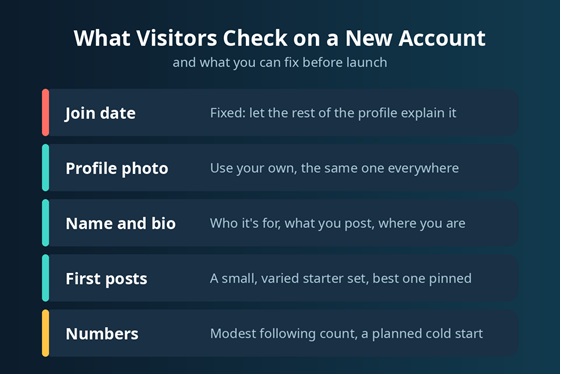
The join date stays. The useful question is whether the rest of the profile makes that date look like a fresh start or like a throwaway.
Username history is entirely in your control. Settle on a handle before you launch and keep it. Every rename is counted on the “About this account” screen. A new account with three name changes looks like it keeps reinventing itself, which is exactly what impersonators do. If the name you want is taken, pick one close variation and stop there.
Location matters for some businesses too. If the account is based in one country and the bio claims another, careful visitors notice. Say where you actually operate.
Fixing the Photo, Name and Bio
These three are where most new profiles fail the glance test, and they take an afternoon to fix.
Use a photo that is yours, and use the same one on every platform. Anyone who searches for it then finds your other profiles rather than a stranger’s. For a brand, a bold logo or a single letter works better than a detailed mark, because the profile circle is tiny in comments and feeds.
For the name and bio, specific beats clever. “Weekend bike repairs in Leeds, booking link below” says who you are, where you are and what you do. “Living my best life” says nothing, and an empty-sounding bio is precisely what fake-profile checklists warn about.
AI writing and image tools are useful at this stage. They can draft ten bio variants under a character limit, tidy a headshot or suggest handles that aren’t taken. This guide to what AI tools can and can’t fix on a new profile covers each part in detail, including the one no generator can produce. Two cautions apply. Edit every draft until it sounds like a person, since averaged phrasing is itself a tell. And if you use an AI-generated portrait, it should look like you on an ordinary day. A polished face that doesn’t match your videos is the thing suspicious visitors look for.
First Posts and Activity Patterns
Content is where real accounts and automated ones separate most clearly. Fake-profile checklists usually flag generic content and long silences followed by sudden bursts of posting. A new account can avoid both.
Before the profile goes out to anyone, give it something to look at. A grid of roughly two or three rows, or a handful of videos on a video-first platform, covers it. Your Social Team’s breakdown of what your first nine posts should be is a practical template for that first grid. Keep them specific to your topic and varied within it, so a visitor sees a range rather than the same post three times. Pin the strongest one or two.
After launch, keep a steady rhythm, even if that means two posts a week. Reply to comments, especially in the first month. Visible conversation is one of the clearest signs that a person runs the account.
The Number Row
Followers, following and post counts are the last thing a visitor checks and the slowest to grow on their own. Two habits help.
First, keep your following count modest. Mass-following strangers in the hope of follow-backs produces the exact ratio that marks a bot.
Second, decide how you will handle the cold start. Small counts read as “just started” at best. Some brands and creators add a first layer of followers or views through a growth provider once the profile and starter posts are finished, so the numbers sit closer to the work on the page. If you take that route, choose a provider that works from your public profile or post link and never asks for your password. Add that first layer after the setup is done, so new visitors land on a complete profile.
A Pre-Launch Checklist
Run these in order before you share the profile anywhere:
- Choose the final handle and display name.
- Upload an original photo or simple logo, the same one used everywhere.
- Write a one-line bio that says who it’s for, what you post and where you operate.
- Publish a starter set and pin the best post.
- Follow a small number of relevant accounts, not hundreds.
- Plan the first month’s posting rhythm and how you will reach your first followers.
Frequently Asked Questions
Does changing my username make an account look suspicious?
Repeated changes can. The change count is visible to anyone who opens “About this account” on Instagram or Threads. One change early on is normal. Several in a short period stand out.
Can an AI-generated profile photo make an account look fake?
It can if it doesn’t match the person. A generated headshot that looks like you is fine. One that looks noticeably better than your videos invites the “is this a generated face?” question.
How long does an account keep looking new?
There is no fixed period. The join date never changes. A profile with a clear bio, a consistent photo, a few weeks of regular posts and replies to comments stops matching the fake-account pattern long before it stops being new.