Security | Threat Detection | Cyberattacks | DevSecOps | Compliance

Secure your secrets at runtime with the 1Password CLI and Environments

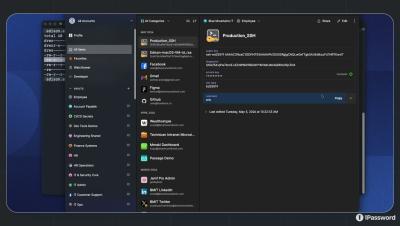
Stop storing secrets in.env files. In this video, we show you how to use 1Password Environments to securely inject environment variables at runtime without storing plaintext on disk. You'll see how the same 1Password Environment powers: 1Password Environments provide secure, read-only access to environment variables across development and production workflows. Key benefits: No plaintext secrets on disk Least-privilege access controls Secure runtime injection Works with CLI, SDKs, and service accounts Reliable automation across macOS and Linux.

Secure your desktop apps with 1Password SDKs

Bring secure, human-in-the-loop authentication directly into your desktop applications. In this video, we introduce desktop authentication support in the updated 1Password SDKs. Your desktop tools and local scripts can now securely access vault items using the native 1Password prompts users already trust. Unlike service accounts, this approach supports human-in-the-loop workflows. Users stay inside your application while explicitly approving access to their secrets.

Security Comprehension and Awareness Measure (SCAM) Demo

What happens when a state-of-the-art AI assistant can read your email, browse the web, and fill in your passwords — but can’t reliably tell a scam from the real thing? In this video, you’ll see real examples of frontier AI agents: These aren’t edge cases. This is the result of 1Password’s new benchmark: SCAM — Security Comprehension & Awareness Measure.

AI Principles in Practice: Auditability in non-negotiable

When AI acts on your behalf, auditability is non-negotiable. In the latest Principles in Practice video, Anand Srinivas, 1Password VP of Product & AI, explains why every AI agent action involving credentials must leave a clear audit trail: Who approved the access and why When and where were credentials used What did the agent access and when Did access end when the task was completed Without auditability, AI usage can break trust between employees, security teams, customers, and regulators.

How to build secure agent swarms that power autonomous systems in production

We worked with the Autonomy team to show how 1Password can secure agent swarms using a safer pattern: just-in-time, least-privilege access, without inheriting broad device, cloud, or infrastructure permissions, and without hardcoding secrets into agents.

1Password presents: Phishing prevention

AI-powered scams are making phishing attacks harder to spot than ever. In this demo, see how 1Password’s phishing prevention feature helps stop users before they share credentials with fraudulent websites. When a site’s URL doesn’t match a saved login, 1Password won’t autofill. Now, when a user tries to paste their credentials anyway, a warning prompts them to pause and take a closer look. This added layer of protection acts as a second pair of eyes at the moment it matters most.

Securing the Future of AI Browsing with 1Password and Perplexity

Join Anand, VP of Product and AI at 1Password, and Kyle Polley from Perplexity for a fireside chat about building the future of secure, AI-native browsing. 1Password and Perplexity are partnering to bring privacy, transparency, and trust to the Comet Browser — the world’s first AI browser and personal assistant. Learn why security must be built in from the start, and how end-to-end encryption and zero-knowledge architecture protect users in the age of AI.

Principles in Practice: Raw credentials should never be shared with LLMs

If you wouldn’t hand your house keys to a delivery driver, why hand your credentials to AI? In this Principles in Practice video, Anand Srinivas, VP of Product & AI at 1Password, explains a critical rule for secure AI use: Raw credentials should never be shared with large language models. Instead of sharing secrets, use them securely: Don’t send raw credentials over the data channel of a protocol like MCP Use proxies and secure autofill instead of sharing secrets Keep credentials out of prompts, embeddings, and fine-tuning data.

Secure AI coding with the 1Password hook for Cursor Agentic Coding IDE

In this video to learn how the 1Password hook for Cursor keeps your environment files secure while using AI-powered development in Cursor. See how 1Password Environments prevent plaintext API keys, hardcoded tokens, and long-lived secrets from ever touching your repo or disk.

Principles in Practice 2: Authorization Should Be Deterministic, Not Probabilistic

Here’s the reality: AI unlocks incredible innovation, but it also introduces real security risk. LLMs are probabilistic, which makes them great for generating code or summarizing data, but unreliable when it comes to enforcing access. Security requires verifiable, rule-based truth. At 1Password, our approach to AI keeps authorization in a secure, auditable flow so you always know who is accessing what, and why.