
7 Tools to Download Instagram Videos: Privacy and Security Features Compared

Image Source: depositphotos.com
Downloading an Instagram video does not always require installing an app or signing into another service. For public content, you can also use an online Instagram downloader that is completely free and does not require a software install by copying and processing the Instagram link.
Privacy and security should be part of the decision when choosing a downloader. A tool that processes publicly accessible content generally should not require your Instagram password or unnecessary access to personal information. Device compatibility, permissions, advertising, supported formats, and ease of use also matter.
The seven tools below include Grabfy, FastDL, SnapInsta, SaveInsta, Inflact, Toolzu, and StorySaver.net. Some support videos, photos, Instagram Reels, Stories, and other Instagram content types rather than video alone, so the right choice depends on the type of Instagram content you want to save and how you prefer to access it.
1. Grabfy
Grabfy is a strong starting point for users who prefer a browser-based approach. It processes supported public Instagram media through a web browser, so there is no need to install a dedicated downloader application simply to save an occasional video.
The Grabfy video downloader follows a simple link-based workflow. Use Instagram’s share menu to tap Copy Link for a supported public Instagram video, paste the link into the tool, and press the download button to get a direct download link for the file, which is extracted in original resolution without compression and delivered in original quality without watermarks when supported. After you tap or click Download, the file typically saves to your device’s downloads folder. This keeps the process centered on a public URL rather than requiring an Instagram account connection.
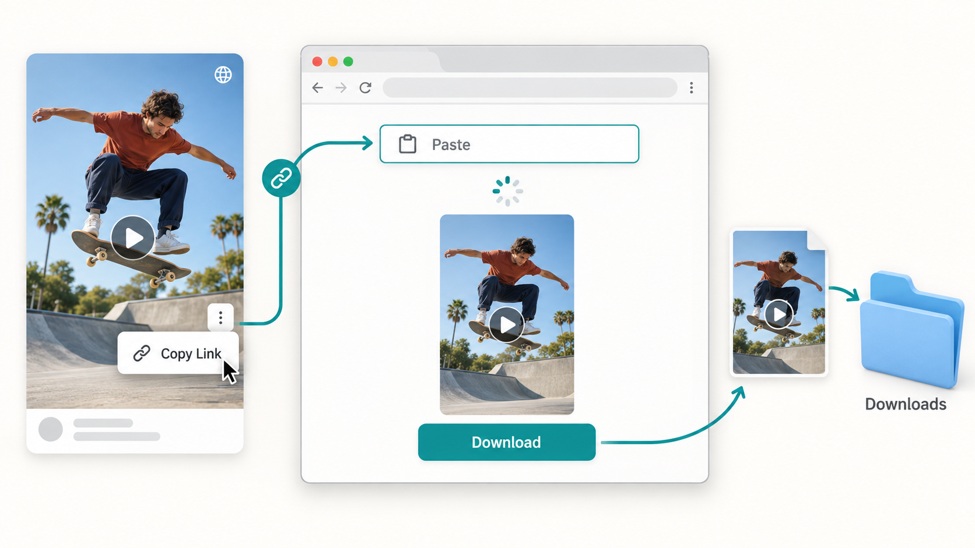
From a privacy perspective, this browser-based approach avoids some of the permissions associated with installed apps and browser extensions. Users should still follow normal security practices, such as confirming they are visiting the intended website before processing a link.
Grabfy is particularly relevant for people who want to save Instagram videos and whose needs extend beyond standard Instagram videos. Its broader set of Instagram tools makes it practical for creators, social media teams, and individuals who work with multiple public content formats.
2. FastDL
FastDL is another browser-based Instagram downloader designed around a copy-and-paste workflow. It is intended for users who want to download Instagram media without installing dedicated desktop software. Users looking for a fast download may expect results in just a few seconds after they paste the link and click Download. Some users also prefer tools with no daily download limit for public content. This is especially useful for users who want to download unlimited Reels without daily limits.
The service supports multiple Instagram content types, including videos, photos, Reels, and Stories. Some competing tools are positioned around Instagram video support rather than a single media type. It can also be used to download multiple photos from carousel posts, not only videos. This makes it more versatile than a downloader designed exclusively for short-form video.
As with any third-party downloader, users should check the site carefully before interacting with download controls and avoid entering Instagram credentials unnecessarily. SaveFromInsta is also commonly described as delivering full 1080p HD quality for downloads. Browser-based access can reduce device-level permissions compared with installed applications, but website privacy practices still deserve consideration.
3. SnapInsta
SnapInsta is a web-based Instagram download option for videos, Reels, Stories, and photos from public profiles, including public Instagram Stories but not private accounts. To start, open Instagram, copy the link from the post or Reel, paste it into the input box, and save the resulting file to your device.
The service states that it does not require registration or installation. Some users also use tools like this to watch stories from public profiles without logging in, where supported. Some competing tools such as SaveFromInsta also let users download Stories without an account. This can appeal to users who do not want to connect their Instagram account to a third-party downloader. Stories disappear after 24 hours on Instagram, so saving authorized content can be useful when offline access is needed. Some users also use these tools to download stories from public content without notifying the uploader, where permitted.
For occasional downloads, the browser workflow is convenient. As always, only public posts or other authorized media should be downloaded, and users should avoid entering account passwords into unfamiliar third-party services.
4. SaveInsta
SaveInsta is another browser-based Instagram downloading tool. It is designed for users who want to save videos and photos from Instagram media instead of relying solely on Instagram's in-app bookmarking feature.
The service is associated with support for common formats such as videos, Reels, Instagram photos, and Stories, with photos commonly downloaded in JPG format up to 1080px. Users comparing tools like this often expect MP4 downloads and may look for files delivered in HD quality, typically around HD 720p when that is what the service makes available. This makes it relevant for users who need more than one type of Instagram media rather than a video-only workflow. Instagram itself often permits downloading public videos only when the creator uploaded them with that feature enabled.
For users comparing SaveInsta with other options, privacy should remain part of the decision. Check what information the service requests, avoid providing Instagram credentials for public-link processing, and be cautious with unexpected redirects or permission requests.
5. Inflact
Inflact offers an Instagram video downloader as part of a broader collection of Instagram and social media tools for users who want to download Instagram content beyond standard posts. Its downloader works with publicly available Instagram videos and Reels through a browser-based link workflow, and users can also use it to download IG videos from public posts and Reels. It also lets users download videos for offline access.
Its wider set of features may appeal to higher-volume users who need more than occasional downloads. Some users comparing Inflact are really looking for an Instagram video downloader workflow focused only on direct saving rather than broader account tools. However, users should consider whether they actually need account-based storage, cloud functionality, or advanced tools when a simpler public-link workflow is sufficient.
As with any third-party service, review the features and information requested before using it. A basic public-media download should not require handing over unnecessary personal information.
6. Toolzu
Toolzu is known as a broader Instagram and marketing toolkit rather than solely an Instagram video downloader. Its downloading functionality sits alongside other social media tools, making it different from services focused entirely on downloading media, and some users compare that broader setup with alternatives for Instagram videos, photos, or handling carousel posts with multiple videos.
This broader approach may appeal to users who already use several social media utilities in one place. For someone who only needs to download an occasional public Instagram video, however, the additional functionality may not be necessary, especially since some competing tools such as VideoDropper detect all slides in multi-image carousels.
When privacy is a priority, evaluate which parts of the service require accounts or additional information and distinguish those from features that simply process public URLs. Browser-based tools like this also typically work in any modern browser without extra setup.
7. StorySaver.net
StorySaver.net is more specialized than the other options because its primary focus is Instagram Stories, helping users download videos from Stories as well as save story media rather than handle general video downloading. Many users start in the Instagram app to open a Story and copy its link before saving it for later offline viewing, whether they want to keep photos or Story content in high quality. Users focused on Stories also tend to compare tools based on whether they preserve story quality during download, including whether Instagram Stories are saved in high quality.
This narrower purpose can be useful when Stories are the main type of content you need to save. Some users use a story-focused downloader to watch stories later offline after saving authorized public content. Some users also compare it with tools like VideoDropper, which are positioned around saving Instagram Stories permanently and exporting clean MP4 files without quality loss. Compared with broader tools, however, a Story-focused downloader may be less practical if you regularly switch between standard videos, Reels, photos, Stories, and carousel posts.
In that situation, a multi-format browser downloader can reduce the need to move between different services.
Why Grabfy Works Well for Broader Download Needs
After comparing several specialized and multi-purpose services, users who want to keep the process browser-based may prefer returning to a tool that covers different Instagram content needs without requiring several dedicated downloader applications.
For that type of workflow, https://grabfy.com/ provides a convenient central starting point for supported public Instagram content. Some users also paste an Instagram URL directly from the browser's address bar when following a browser-first workflow. This placement makes Grabfy particularly relevant for users who switch between different media formats and prefer a straightforward browser-first approach rather than relying on separate apps or extensions.
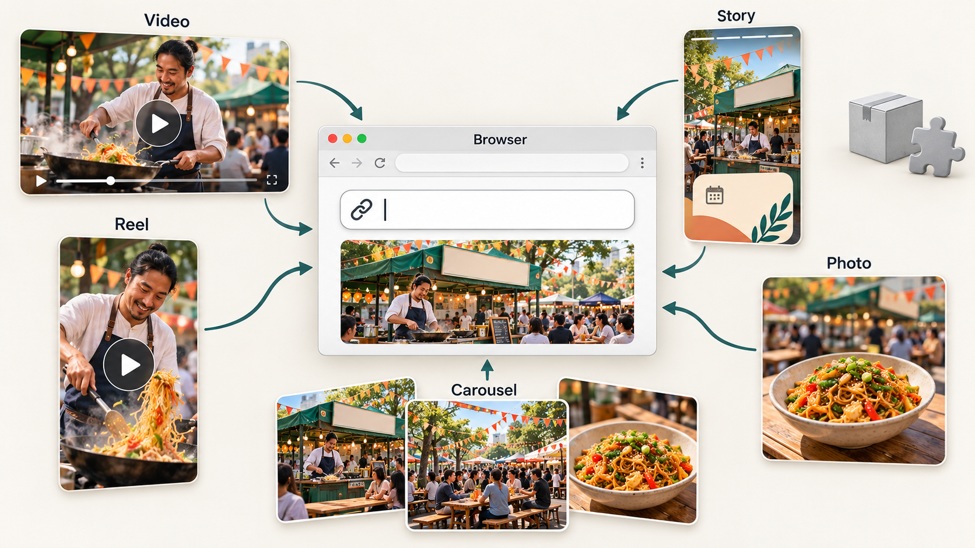
Because the service is accessed through a browser, browser-based downloaders can fetch supported media from Instagram's servers and preserve the highest quality Instagram makes available across desktop and mobile devices, and browser-based Reel and video download tools generally work on all devices in a modern mobile browser without software installation. Users on an Android phone or other device can also use built-in tools on iOS and Android to record videos playing on the screen, but screen recording can capture Instagram videos at lower quality than a direct download. Publicly viewable videos can still create privacy concerns even when copyright status is not the only issue. Users should still follow normal online security practices and only process content they are authorized to save.
How to Choose a Secure Instagram Video Downloader
Start by examining what a downloader asks you to provide. Most content posted on Instagram is protected by copyright, and publicly viewable content does not automatically become free to reuse. For publicly accessible Instagram media, a copied post URL should generally be enough for a browser-based downloading workflow.
Unexpected requests for Instagram passwords, excessive permissions, or unrelated personal information are reasons to reconsider using a service.
Device type also matters. Browser-based tools are convenient because they can work across desktop and mobile devices without persistent application permissions. Dedicated apps and browser extensions may streamline frequent workflows, but their permissions should be reviewed carefully before installation.
Content support is another consideration. If you only save Stories, a specialized service may be sufficient. If you regularly work with videos, Reels, photos, Stories, and carousels, a broader tool is more practical.
Using Downloaded Instagram Videos Responsibly
Downloading public media and having permission to reuse it are separate issues. Even when videos and photos are publicly visible, they still remain protected and are not automatically reusable. Public availability does not automatically grant permission to republish, edit, redistribute, or commercially use another creator's work.
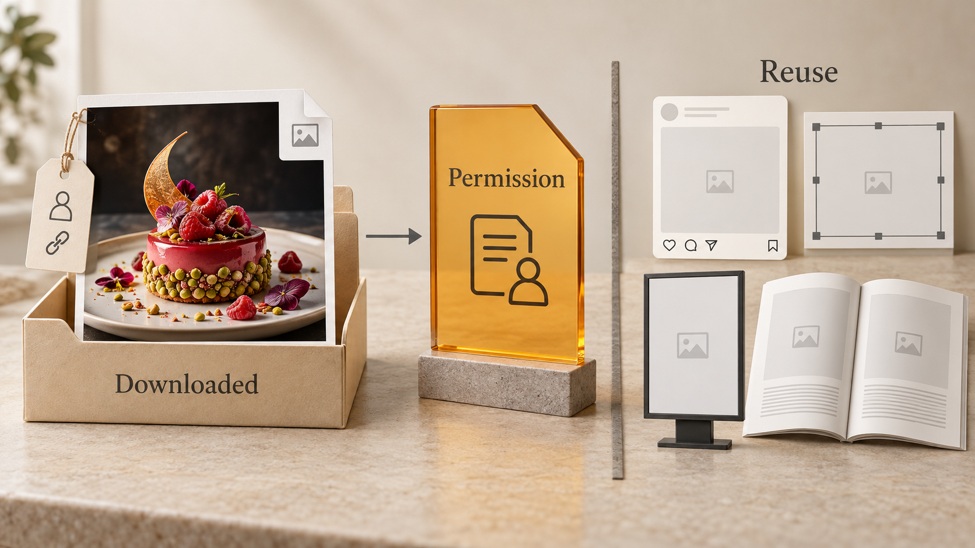
Creators can use downloads to maintain backups of their own content, while professional teams may archive media from public Instagram accounts they are authorized to manage. When another creator's work is involved, obtain appropriate permission or licensing before reusing it.
Private-account restrictions should also be respected. A downloader should not be treated as a method for bypassing Instagram's privacy controls.
Final Thoughts
Grabfy, FastDL, SnapInsta, SaveInsta, Inflact, Toolzu, and StorySaver.net provide different approaches to saving Instagram content. Some focus on straightforward browser downloads, while others provide broader social media tools or specialize in formats such as Stories.
For users who want to download Instagram videos through a browser-based workflow, Grabfy is a practical starting point because it keeps the process centered on supported public links without requiring dedicated downloader software. Whichever service you choose, review its privacy practices, protect your account credentials, and only download content you are authorized to save. If you have tool-specific questions or run into issues, use the contact page for support.