Security | Threat Detection | Cyberattacks | DevSecOps | Compliance

Risks Faced by Cloud-Native Apps and How to Assess Them

Modern organizations are adopting a cloud-native approach to their application development. While this approach provides many benefits, it also makes organizations face several challenges, including the challenge of securing the application with a completely different approach. In this blog, we will discuss how software changes and how organizations should think about securing it.

Join Us in Making History: Free SOC 2 Readiness for Startups

Compliance software platforms have been around since 2016. These solutions may vary in focus, but typically, they share the same few traits. They tend to prioritize speed over quality, hide their pricing structures, and don’t allow prospects to try out the product until they’ve officially run through a demo and signed a contract.

Four Elements Security Leaders Must Consider When Building an Autonomous SOC

The SOC is changing. And to keep cybercriminals from wreaking havoc, security teams must mature their security operations to derive more value from the systems, tools, and data at their disposal. To do so, organizations are increasingly automating more SOC tasks and have long-term plans to build autonomous SOCs to augment their security analysts.

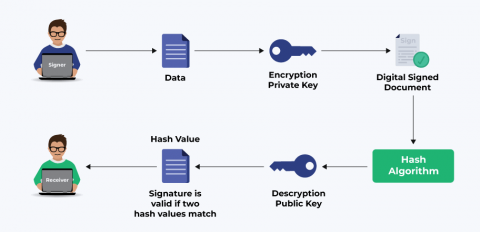
What are the Differences Between Encryption and Signing? Why Should You Use Digital Signatures?

While we have all used digital security certificates like SSL/TLS, code signing certificates, or others, many don’t know the security technology behind them. Stringent security standards ensure that the cyber threats looming around us never get to our digital systems. Due to such threats, there’s a constant advancement happening in data security technology to protect sensitive information. Encryption and Signing are two methods used widely for data security.

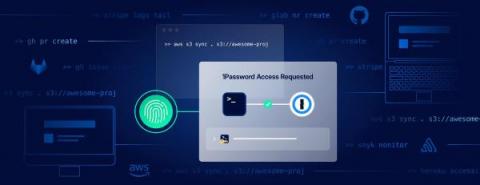
Unlock Any CLI Using Your Fingerprint With 1Password Shell Plugins

With 1Password Shell Plugins, you can forget about storing insecure plaintext keys on disk or manually typing credentials or MFA codes into your terminal. Instead, sign on to any CLI with your fingerprint. Install & configure the relevant plugins for your toolchain via the 1Password CLI and you’re all set. You can even build and contribute your own plugins as needed via the open-source community project.

The Cyber Security Skills Shortage

Whether you are training to become an information security professional or if you are more seasoned in the cyber security industry, this is an episode you don’t want to miss. In this episode, I am joined by Josh Davies and Keith Christie-Smith to talk about what the cyber security skills shortage means for the industry and how we can address this.

How to Sign Kubernetes using Sigstore

In this livestream we are joined by Adolfo Veytia, Staff Software Engineer at ChainGuard and Tech Lead on the Kubernetes SIG-Release team, as we talk about they were able to tackle signing all of the Kubernetes v1.24 image artifact using Sigstore. We then demonstrate signing an image and vulnerability scan result attestations with Sigstore's cosign utility. Didn't catch the live stream? Ask all of your Snyk questions and we’ll do our very best to answer them in the comment section.

Hackers Are Using These 3 Techniques to Bypass MFA

There’s no denying that multi-factor authentication (MFA) is an essential security measure that significantly improves an organization’s cyber posture. However, there is no silver bullet in cybersecurity. Though multi-factor authentication proves extremely helpful, determined and resourceful cybercriminals can still find techniques to bypass it. Let’s look at some frequently-used methods cyber-attackers leverage to bypass MFA.