Security | Threat Detection | Cyberattacks | DevSecOps | Compliance

Corelight for the everywhere cloud

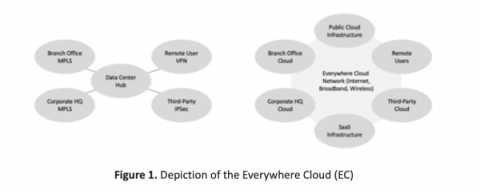
Editor's note: This is the first in five-part series authored by Ed Amoroso, founder and CEO of TAG Cyber, which will focuses on how the Corelight platform reduces network security risks to the so-called Everywhere Cloud (EC). Such security protection addresses threats to devices and assets on any type of network, including both perimeter and zero-trust based.

Any2Cloud to Recover Kubernetes Clusters from GKE to AKS

Learn how easy it is to do a full-stack migration of a Kubernetes application from GKE to AKS using CloudCasa. In the video, Martin Phan demonstrates how to use CloudCasa do a GKE backup of an application that is using MySQL on a PV, and then recover the application to AKS using the Any2Cloud recovery capability of CloudCasa.

Understanding the basics of Cloud Security: What is Zero Trust & Why does it Matter?

Cybersecurity professionals are tasked with the difficult job of protecting their organization's data from malicious actors. To achieve this goal, zero trust security has become an essential tool for organizations. But what exactly is zero trust? In this post, we’re going to separate signal and noise by disambiguating the term zero trust. We’ll talk about what it is, why it matters, and key takeaways you should have regarding the state of cybersecurity in 2023.

6 Tips to Setup Foolproof AWS Security Groups

Adopting cloud technologies is one of the most common tech strategies followed by modern organizations. This may be due to various reasons depending on the nature of the business. But there are a few standard components that span across most domains, not least the fact that cloud vendors allow developers to easily create and take down resources on the cloud with minimal effort.

GCP FileStore Backup for Kubernetes Persistent Volume Data on GKE Clusters

Google Cloud Provider (GCP) Filestore is a good place to keep lots of rich, unstructured data, such as graphic designs, video editing files, and other media workflows that use files as input and output. Having GCP Filestore backups enables users to protect themselves against the rare case of inaccessibility, accidental changes, ransomware attacks, or other types of disasters.

Improve your AWS security posture, Step 2: Avoid direct internet access to AWS resources

In the first blog in this series, we discussed setting up IAM properly. Now we’re moving on to the second step, avoiding direct internet access to AWS resources. When AWS resources like EC2 instances or S3 buckets are directly accessible via the Internet, they are vulnerable to attack. For example, brute force attacks on SSH login, denial of service (DOS) attacks on server resources via Layer 3, 4, or 7 flooding, or the inadvertent disclosure of data on an S3 bucket.

Self-Hosted vs. Cloud-Based Password Manager

A few customers have asked about the pros and cons of a self-hosted password management solution, such as Bitwarden. Since I have a lot of experience with this topic, I thought I would share some of the key reasons to use a cloud-based password manager like Keeper, instead of a self-hosted password vault.

Tigera 2023 predictions: Cloud native security and the shifting landscape in 2023

Cloud computing and the use of cloud native architectures enable unparalleled performance, flexibility, and velocity. The speed of innovation has driven significant advancements across industries, but as digitalization continues pushing applications and services to the cloud, bad actors’ intrusion techniques have also become more sophisticated.

7 AWS Security Tools for 2023

AWS (Amazon Web Services) allows businesses to quickly and securely build and scale applications. Hence, there is exponential growth in AWS usage among businesses and organizations. For example, As of 2020, AWS held 76% of enterprise cloud usage, reflecting the power and importance AWS holds. This increased use of AWS tools and services opens new doors for cyber attackers. However, AWS is a very reliable cloud service provider that works hard to ensure protection over its infrastructure.

Cloud Asset Inventory and Visualization

Track your cloud asset inventory at a high level in one view and continuously monitor your cloud assets and investigate details about individual assets in the Cloud Assets table and graph. The Asset Inventory Overview shows top counts, trends, detections, and more across multiple clouds. Filter the widgets to see the info you want, and click areas in the widgets to see details in the Cloud Assets table.